
How to try CallSmarter before you buy: 5 free ways
Talk to Foxy in your browser, get a real demo call on your phone, see our own funnel and run your numbers — five honest ways to test CallSmarter first.

The best way to judge a voice agent is to talk to one. Before you sign anything, you can try CallSmarter for free on our website in five ways: talk to Foxy in your browser, let her call your phone in about a minute, see how our own sales funnel runs on the product, run your figures in our calculators and, when you want an agent on your own data, start a pilot. No account and no card are needed for the first four.
This guide explains what each option shows, what it does not show, and the honest limits of each — so you know exactly what you are testing.
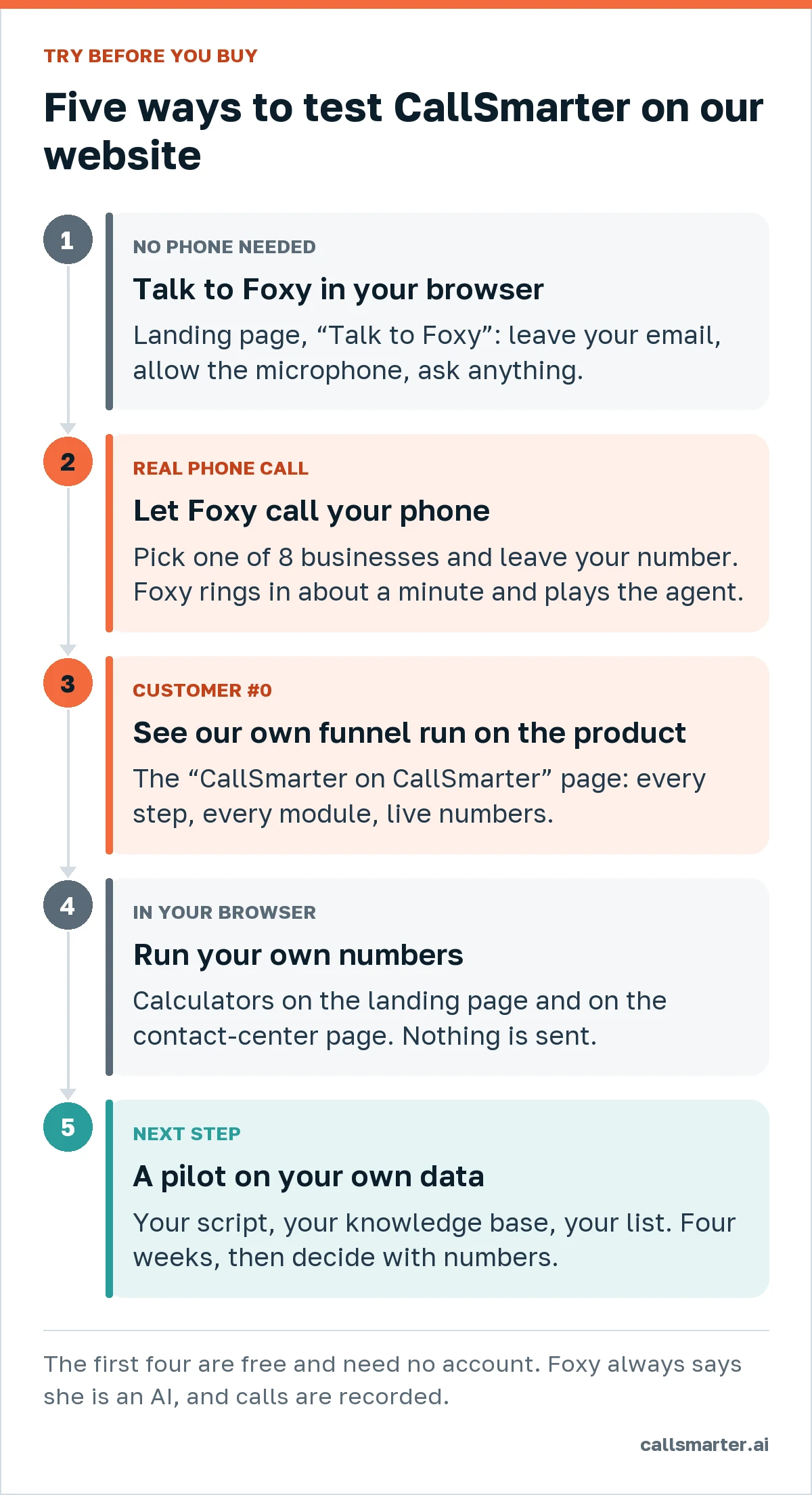
1. Talk to Foxy right in your browser
On the landing page, the “Talk to Foxy” block opens a live voice conversation with Foxy, our AI voice agent, using only your browser’s microphone. Nothing to install, no phone needed.
How it works:
- Before the call you leave your contact in a short form: an email is required, phone, name and company are optional, and a marketing opt-in is a separate, unticked box. We ask for it so that Foxy never promises to “email you the details” without having an address — and so the conversation becomes a real request in our CRM, exactly like it would for your customers.
- Foxy introduces herself as an AI assistant and says the conversation is recorded. The same notice appears as text in the call window.
- She answers from our own knowledge base: what CallSmarter does, the products, how the pilot works. If she does not know something, she says so rather than inventing it.
- The conversation is limited to a few minutes. When time is almost up, Foxy sums up and says goodbye instead of cutting you off mid-sentence.
What it shows: how natural the voice sounds, how fast she answers, how she handles interruptions and questions that are off-script. This is the same web widget a business puts on its own website with CallSmarter Reception.
Tip: please don’t share sensitive data — it is a demo.
2. Let Foxy call your phone: the live demo call
The strongest demo is the one on your own phone. On the “Let Foxy call you now” page you pick your kind of business and Foxy calls you in about a minute, playing the AI agent of a fictional business like yours.
There are eight personas to choose from:
| Business | What Foxy does in the role |
|---|---|
| Dental clinic | Receptionist: books an appointment |
| Real estate | Qualifies a buyer, books a viewing |
| Car dealership | Books a test drive |
| Beauty & spa | Books a treatment |
| Education | Answers enrollment questions |
| Home services | Books a visit for a quote |
| Insurance renewal (outbound) | Checks interest, hands over to an advisor |
| B2B sales, SDR (outbound) | Qualifies a lead, books a meeting |
The two outbound personas show the other side of the product: Foxy calls the customer, not the other way round. In the insurance renewal, Foxy checks interest and explains that, in a real call, she would now warm-transfer you to a human advisor with a call card.
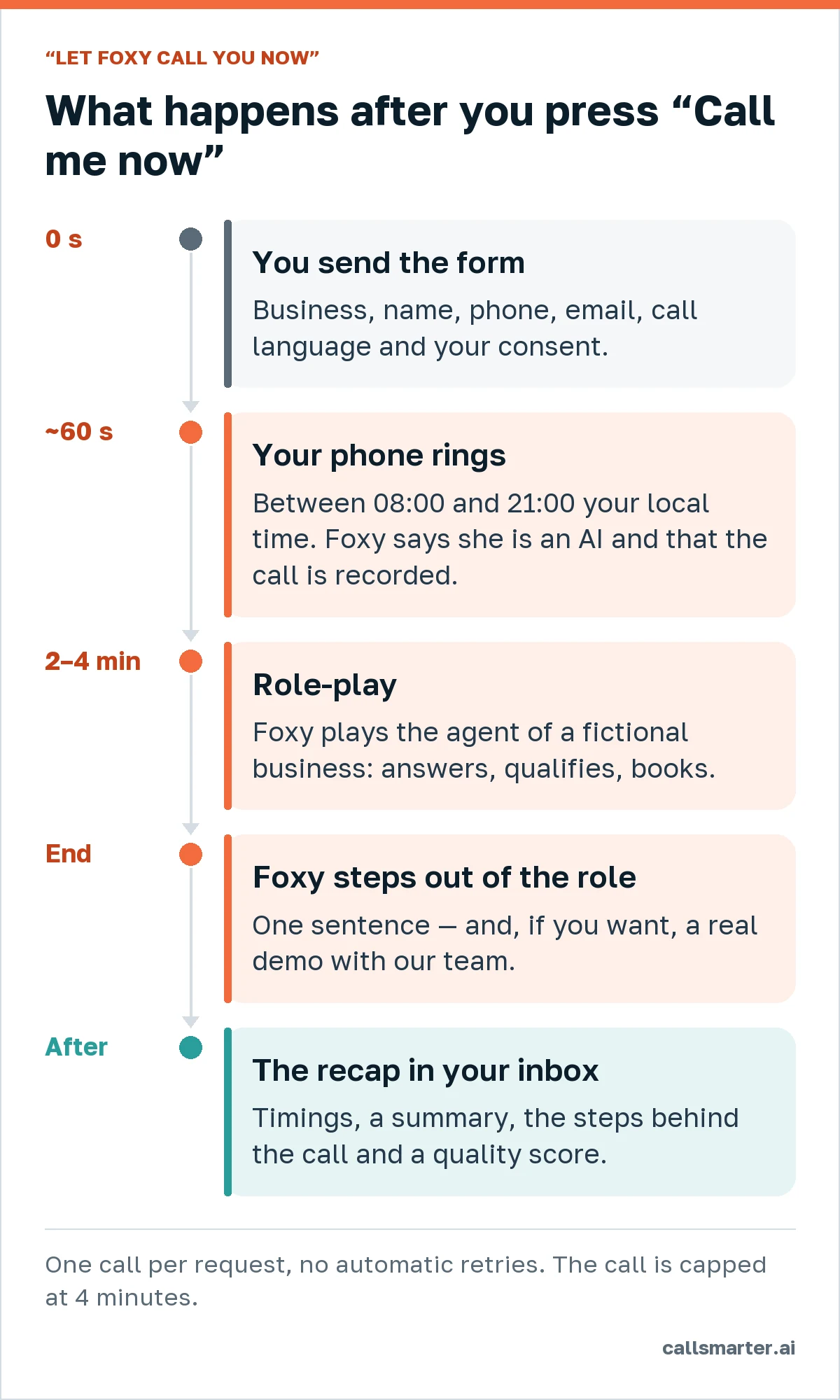
What happens:
- You fill in your name, phone, email, optional company, the language of the call and your consent to this one recorded call.
- Your phone rings in about 60 seconds. Foxy’s first sentence says that she is an AI and that the call is recorded.
- Two to four minutes of role-play: she answers, qualifies and books — just as she would for a real business. Try to throw her off; you can interrupt her at any time.
- At the end Foxy steps out of the role in one sentence and, if you want, offers a real demo with our team.
- You receive a recap email: how fast the call came after the form, how long it lasted, a summary, the steps behind the call and its automatic quality score.
The honest limits:
- Demo calls are placed only between 08:00 and 21:00 local time. If you send the form outside that window, the page offers to schedule the call for the next slot.
- Only ordinary mobile and landline numbers in the countries listed in the form — most of Europe and the Americas. Premium, short and toll-free numbers are excluded.
- It is one call per request, with no automatic retries, and each number and email can get only a couple of demo calls a week, so nobody can use the page to flood someone else’s phone.
- Consent is required, and a quick bot check runs before the call. Disposable email addresses are not accepted.
- There is a daily budget of demo minutes. When it is used up, the page says so and offers a demo with our team instead.
- The call is capped at four minutes. Recordings are deleted automatically after 90 days.
3. See our own funnel run on CallSmarter
We sell CallSmarter with CallSmarter. The “CallSmarter on CallSmarter” page shows our own sales and customer funnel step by step — the widget, the callback to every request, the reminder before each demo, the follow-up, onboarding and NPS — and which product module each step uses. There is a longer write-up in How CallSmarter sells CallSmarter.
The page also shows live, anonymised numbers for the last 90 days: requests, speed to lead, the share of callbacks that were answered and the demo show rate. Until a metric has at least ten data points, it says “collecting data” rather than showing a number that means nothing.
What it shows: not just one conversation, but how agents, scenarios, CRM, meetings and quality scoring work together every day.
4. Run your own numbers
Two calculators let you estimate the effect on your business. Both run in your browser — nothing is sent to us.
- On the landing page, the calculator has two tabs: for inbound, what missed calls may cost you in revenue; for outbound, how many hours of first calls a campaign represents.
- **On the contact-center page**, a more detailed calculator estimates the agent time Foxy frees up by taking over the dials that end without a conversation, what that time could be worth in extra sales, and what CallSmarter would cost for the same volume. The default values are an example (an insurer with 50 agents) — replace them with yours. The formulas are written out on the page, and a link saves your numbers so you can share them with a colleague.
The calculators use the list price of €0.35 per minute and our billing rules (per second, unanswered calls free); the monthly plan and VAT are not included. The results are estimates built on your own conversion figures, not promises.
5. When you are ready: a pilot on your own data
The demos show Foxy playing someone else. A pilot shows her working for you: your script, your knowledge base, your calendar and CRM, your own customer list with its legal basis. A typical pilot lasts about four weeks with 500–1,000 calls, and you decide with real numbers — answered calls, qualified requests, cost per result. For contact centers, the pilot runs against a control group on the same list.
Before you book, it helps to read what an AI voice agent is and how it works, so you know which questions to bring.
Which option to start with
| If you want to… | Start with |
|---|---|
| Hear the voice and test questions in two minutes | Talk to Foxy in your browser |
| Feel what your customers would feel on the phone | The demo call |
| See the whole system, not one call | CallSmarter on CallSmarter |
| Build a business case | The calculators |
| Test on your own customers | The pilot |
All of it follows the same rules as the product: Foxy always says she is an AI, calls are recorded and you are told so, and no marketing goes out without your consent.
Frequently asked questions
Do I need an account or a credit card to try CallSmarter?
No. Talking to Foxy in the browser, the demo phone call, the showcase page and the calculators are free and need no account. You only leave a contact so Foxy knows who she is talking to — and, for the demo call, where to ring.
Is the demo call really an AI?
Yes. Foxy is an AI voice agent built on CallSmarter and says so in her first sentence, together with a recording notice. Nobody from our team is on the line.
Why didn’t my demo call come through?
Demo calls run between 08:00 and 21:00 local time, only to ordinary mobile and landline numbers in the countries listed in the form, and each number gets a limited number of demo calls. Outside the window you can schedule the call for the next one.
Will you call me again after the demo?
No. It is one call with no automatic retries. You only get marketing email if you tick the separate box, and you can unsubscribe at any time.
How do I test an agent with my own script and data?
That is what the 4-week pilot is for: we set up an agent with your knowledge base and your list, and you decide with real numbers.