
Foxy now speaks 9 languages: a multilingual AI voice agent
CallSmarter agents now talk in Spanish, English, Russian, Hebrew, Catalan, Portuguese, French, German and Italian. How the call language is picked and switched.

Foxy, the CallSmarter AI voice agent, now speaks nine languages: Spanish, English and Russian, plus Hebrew (written right to left), Catalan, European Portuguese, French, German and Italian. Each one comes as a language pack: not just the conversation itself, but the AI disclosure, the recording notice, the voicemail message and the emails your customer receives afterwards.
For a business this means one agent and one panel for customers who do not all speak the same language — and no need to guess in advance which language each call should be in. Below: how the language of a call is chosen, what happens when the customer switches, what stays in Spanish, English and Russian, and what we are still checking.
Which languages, and what is translated
| Language | Code | Note |
|---|---|---|
| Spanish | es | Default language |
| English | en | |
| Russian | ru | |
| Hebrew | he | Right to left in emails and the web widget |
| Catalan | ca | Set explicitly (not guessed from the number) |
| Portuguese | pt | European by default; Brazilian callers are served in Portuguese too |
| French | fr | |
| German | de | |
| Italian | it |
In each of these languages the platform has its own wording for what the agent must always say: that she is an AI assistant, that the call is recorded, the message left on voicemail, the promise of a callback and the wrap-up when time is almost up. The texts the customer sees — emails, the website widget, form and payment links, the unsubscribe page — are in all nine languages too.
What stays in three languages: the panel your team works in, and the notifications and emails to your team, are in Spanish, English and Russian. Our own website is also in those three, so links in emails sent in other languages point to the English version.
How the call language is chosen automatically
You do not pick the language call by call. CallSmarter goes down a short list and uses the first thing it knows:
- The lead’s language — from your CSV, the API or the website form.
- The customer’s language in the CRM — the language they actually spoke last time.
- The agent’s language — set in the panel; choose “Auto” to skip this step.
- The phone prefix — +972 → Hebrew, +351 or +55 → Portuguese, +33 or +32 → French, +49, +43 or +41 → German, +39 → Italian, +44, +1 or +353 → English, +7 → Russian, +34 and Latin America → Spanish.
- If nothing is known — Spanish.
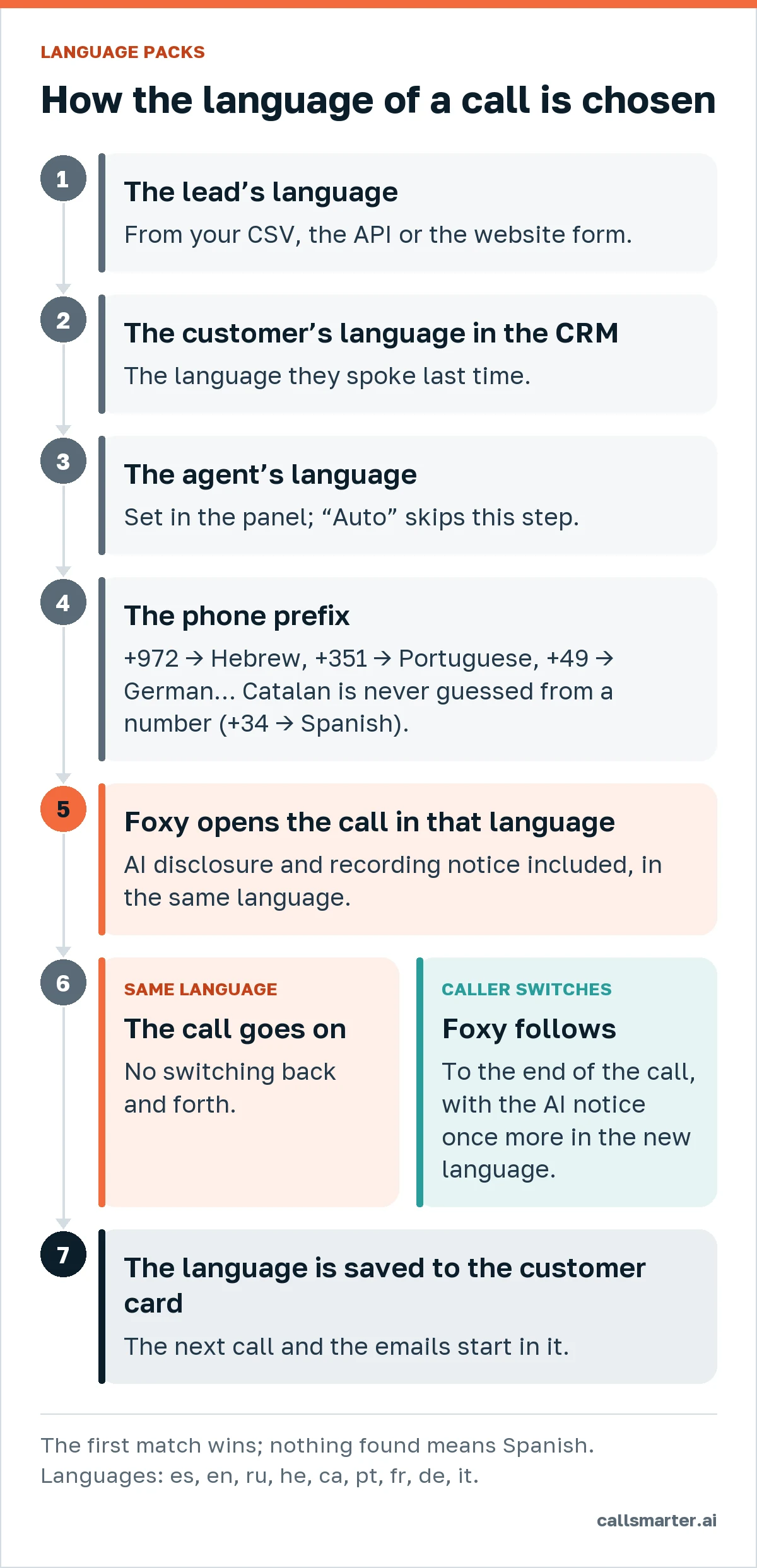
Two honest caveats. Catalan is never guessed from a number: a +34 number is Spanish by default, so set Catalan on the lead, the customer or the agent. And countries with several languages — Switzerland, Belgium, Canada — get one language from the prefix; if it is the wrong one, the customer’s answer corrects it.
On inbound calls through the website widget, the call starts in the language of the page (or the line’s settings), then the agent’s language.
When the customer switches language
People do not always answer in the language you expected. If the customer clearly speaks another supported language — in whole sentences, or by asking — Foxy switches and stays in that language until the end of the call, without jumping back and forth. Right after switching she says the AI disclosure once more, in the new language, so the notice is understood.
If the customer speaks a language Foxy does not support, she carries on in the current language (or English) and politely says which languages she can speak.
At the end of the call the language actually spoken is saved — on the call and on the customer card in the CRM. The next call to that customer starts in it, and so do the emails they receive afterwards: a meeting confirmation, a recap, an offer. Hebrew emails are laid out right to left.
The AI disclosure in every language
Under Article 50 of the EU AI Act, a person must be told they are talking to an AI system, unless it is obvious; the obligation applies from 2 August 2026. CallSmarter adds the disclosure and the recording notice to the first sentence of every call, in the language the call starts in — it does not depend on how a client wrote their script. If the conversation moves to another language, the notice is repeated once in that language. More on the rules in our GDPR and AI Act guide.
A detail of quality: Foxy’s voice is female, so the platform’s own phrases use the feminine form wherever a language has grammatical gender — “una asistente” in Spanish, “ravie” in French, “lieta” in Italian, “עוזרת” in Hebrew. The customer, whose gender the agent does not know, is addressed neutrally.
Why it matters for businesses in Spain
- Tourist regions. On the coasts and the islands, a holiday rental, a clinic or a home-repair company takes calls from British, German, French, Italian and Portuguese customers in the same week. See how this works for real estate and holiday rentals.
- Catalonia. Customers who prefer Catalan can be served in Catalan, from the first word if you mark it on the customer or the agent.
- International customer bases. One campaign to a mixed list: each person is called in their own language, without splitting the list by hand.
What we are still checking
We would rather say it plainly: the platform phrases for Hebrew, Catalan, Portuguese, French, German and Italian are being reviewed by native speakers. In the panel these languages carry a mark until the review is done. A few known limits apply to every language: phone audio is narrowband, so names, numbers and email addresses are harder to hear — that is why Foxy always spells email addresses back letter by letter and asks you to confirm. Recognition and voice quality in Hebrew and Catalan have not yet been checked on a live phone call.
Hear it in your language
The quickest test is your own phone: on the “Let Foxy call you now” page you can choose any of the nine languages for the call. Or talk to Foxy in your browser and switch language mid-conversation to see how she follows. Other ways to test before buying are in How to try CallSmarter before you buy.
Frequently asked questions
Which languages does the CallSmarter voice agent speak?
Nine: Spanish, English, Russian, Hebrew, Catalan, European Portuguese, French, German and Italian. The panel itself stays in Spanish, English and Russian.
Do I have to set the language for every call?
No. The language is picked automatically: the lead’s language, then the customer’s language in the CRM, then the agent’s language, then the phone prefix. Spanish is the default if nothing is known.
What if the customer answers in another language?
Foxy switches to that language for the rest of the call, repeats the AI disclosure once in the new language and saves the language to the customer card for next time.
Can it detect Catalan from a phone number?
No — a +34 number says nothing about Catalan, so it starts in Spanish. Set Catalan on the lead, the customer or the agent, or simply answer in Catalan and Foxy will follow.
Can I hear it before buying?
Yes. On the demo call page you can choose any of the nine languages for the call.