
After-hours answering service: let AI take the night shift
An after-hours answering service with AI: Foxy answers while you're closed, books or logs every request in your CRM and alerts the team when it's urgent.

An after-hours answering service picks up when your business can't: evenings, nights, weekends and holidays. With an AI agent on the line, every call gets answered in your company's name, the caller hears that they are talking to an AI, and the request is captured completely — who, what, how urgent, when to call back — then booked or logged in your CRM. If it's urgent, the person on call gets an alert straight away. If it isn't, your team finds a tidy list in the morning instead of a pile of voicemails.
This guide shows what the night shift looks like with Foxy, our AI assistant, how to define “urgent” for your business, where AI should step aside, and how to set it up.
Why after-hours calls matter
Customers call when the problem happens, not when you're open: the boiler fails on Sunday night, a tooth starts hurting at 10 p.m., someone finds the flat they want while browsing after dinner. When nobody answers, many callers don't leave a message — they try the next business. You don't need an industry statistic to see the effect; your own phone logs show how many calls arrive outside opening hours. Our guide on the cost of a missed call turns that into a money figure with your numbers.
The classic options all have a catch:
- Voicemail only records, and the messages are often incomplete (“call me back” with no number or problem).
- Forwarding to a mobile means someone on the team never really switches off.
- A human answering service works, but is priced per call or minute with a script, and usually passes on a short message rather than a structured record.
What happens when Foxy takes the night shift
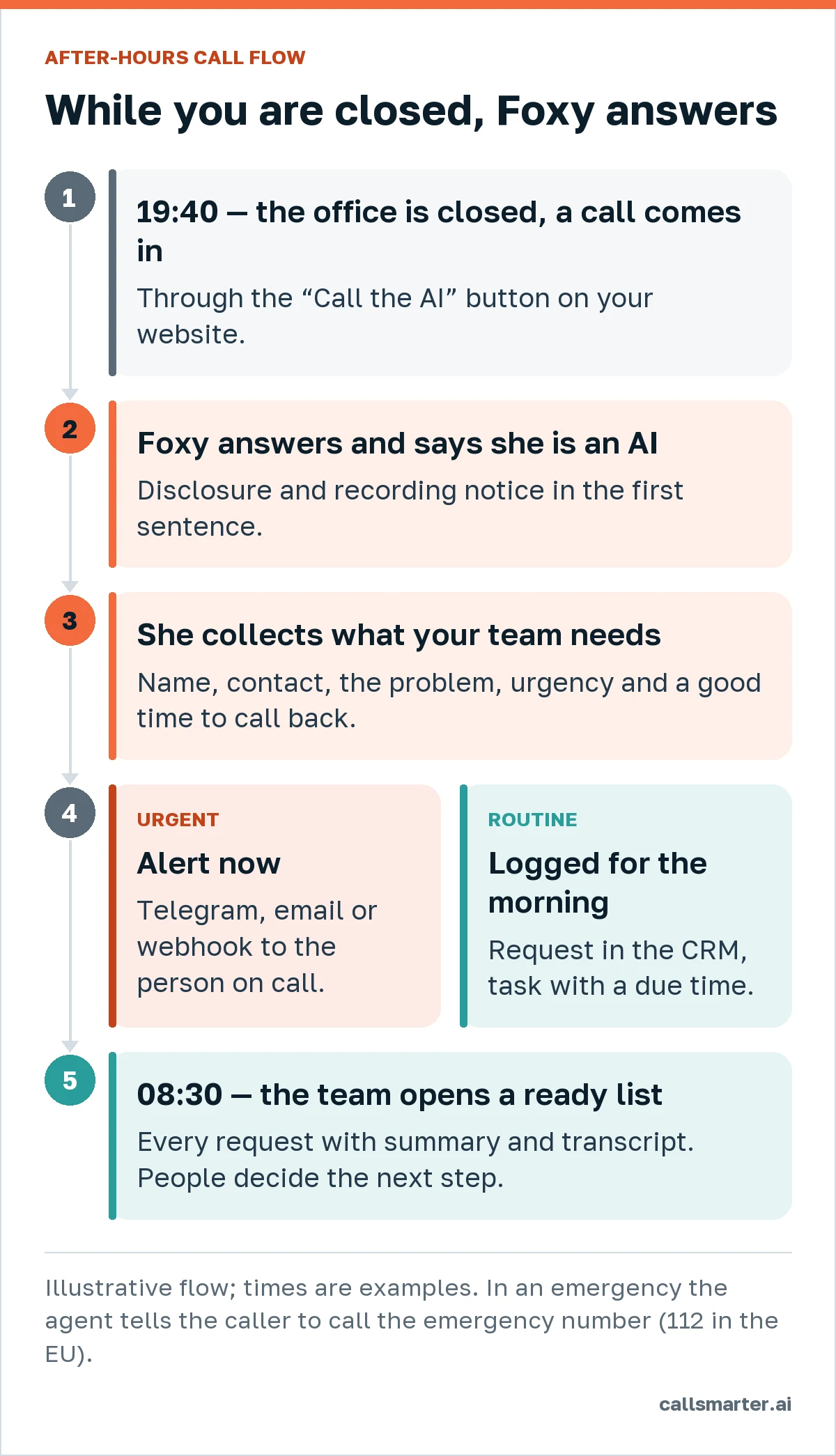
- The call comes in. Today with CallSmarter, through the “Call the AI” button on your website; answering on a phone number is in preparation.
- Foxy answers and says she's an AI. “Hello, I'm the AI assistant at Smith Plumbing. This call is recorded. How can I help?” Transparent from the first second, as Article 50 of the EU AI Act requires.
- She collects what your team needs. Name, best contact, the problem in the caller's own words, address or service, and a good time to call back. She answers common questions from your knowledge base (call-out area, opening hours, what happens next) and doesn't invent the rest.
- Urgent or routine.
- Urgent: an alert goes to the person on call — Telegram, email or a webhook into your own system — with the summary. Our target is under a minute from the end of the call.
- Routine: the request is logged in the CRM with category and urgency, plus a task with a due time for the morning. If booking is in the script, Foxy books it and the meeting can sync to Google Calendar.
- Morning. The team opens a ready list: every request with summary, transcript and recording, sorted by urgency.
Define “urgent” for your business
The value of an after-hours service depends on one decision: what wakes someone up and what waits. Write it down as simple rules the agent can ask about:
| Business | Urgent (alert now) | Waits for the morning |
|---|---|---|
| Plumbing / heating | Active leak, no heating with vulnerable people at home | Quote, maintenance visit |
| Dental clinic | Severe pain, swelling, trauma (after advising 112 if serious) | New appointment, cancellation |
| Property management | Lockout, flood in a rental | Viewing request, invoice question |
| Holiday rentals | Guest can't get in, no electricity | Late check-out request |
Keep the urgent list short. If everything is urgent, the person on call stops reading the alerts. For sector examples, see our guides for home services, dental clinics and estate agents and holiday rentals.
Where AI should step aside
- Emergencies. An AI agent is not an emergency service. If life or safety may be at risk, Foxy tells the caller to call 112 (the EU emergency number) and logs the call. She doesn't triage.
- Sensitive conversations. Bereavement, serious complaints, anything that needs a human voice: she logs it as a priority callback.
- Payments. No card numbers by voice.
How to set it up
- Hours. Set when the AI line covers calls: outside opening hours only, or also at lunch and when the line is busy.
- Knowledge base. Service area, prices from your list, what you do and don't do, what to say about response times — honestly.
- Urgency rules and who's on call. Who receives the night alert, on which channel, and what's in it.
- Morning routine. Who owns the list, and by when every request gets a call back.
- Test. Call it yourself at 11 p.m. and play the difficult customer. Listen to the recording, read the transcript, adjust the script.
A pilot of about four weeks is usually enough to see how many calls arrive after hours and how many become customers.
How to measure the night shift
After a few weeks, the panel answers the questions that matter without guesswork:
- How many calls arrive after hours, by day of the week and hour. Many businesses are surprised by Sunday evenings or the hour after closing.
- What they are about. Request categories show whether nights bring emergencies, new customers or admin questions — and whether your website or opening hours should change.
- How many were urgent, and how quickly the person on call reacted to the alert.
- How many became business. Requests that turned into a booked job, an appointment or a sale, tracked in the CRM.
- Quality. Every call gets an automatic quality score from 0 to 100 and you can listen to any of them; low scores point to gaps in the knowledge base.
CallSmarter's value report estimates the revenue those requests represent — requests × your conversion rate × your average ticket — against what you pay. It's an estimate built from your own inputs, not a promise, but it turns “the AI answered some calls” into a number you can decide on.
What it costs
With CallSmarter (excluding VAT): AI reception from €149/month, a one-off €290 setup, and €0.35 per minute of conversation, billed per second with a 30-second minimum per answered call. No night or weekend surcharge. See pricing. For the broader picture of inbound and outbound AI, read voice AI for business; for how a single AI-answered call works step by step, see the AI phone answering service guide.
Hear the night shift for yourself
Let Foxy call you now and pretend you're a customer with a problem at 11 p.m. — or talk to her in your browser. When you're ready to cover your own after-hours calls, request a pilot.
Frequently asked questions
What is an after-hours answering service?
A service that answers your customers' calls when your business is closed — evenings, nights, weekends, holidays — takes the details of each request and passes them to your team, alerting someone straight away if it's urgent.
How does an AI after-hours service decide what's urgent?
You define it: for a plumber, “water leak” or “no heating”; for a clinic, pain or swelling; for a property manager, a lockout. The agent asks about it and, when it matches, sends an immediate alert to the person on call. Everything else waits for the morning as a task.
What happens with real emergencies?
The agent is not an emergency service. If someone's life or safety may be at risk, it tells the caller to call the emergency number (112 in the EU) and logs the call.
Can Foxy book appointments at night?
Yes, if booking is part of the agent's script. Meetings booked by the agent can sync to your Google Calendar; otherwise she logs the preferred time and your team confirms in the morning.
How much does it cost?
With CallSmarter, AI reception starts at €149/month (excluding VAT) with a one-off €290 setup, plus €0.35 per minute of conversation. There's no night or weekend surcharge.